Automated FFmpeg encoding pipeline
A Bash-driven pipeline that automates video transcoding, format conversion, and file organisation with FFmpeg. It removes repetitive manual encoding and makes the output predictable.
The problem
Video arrives from different sources with inconsistent codecs, containers, resolutions, and metadata. Running FFmpeg by hand for every file is slow and easy to get wrong: one forgotten flag produces a file that looks fine until it reaches a player that cannot decode it.
The pipeline standardises the process. Files go into an input directory; encoded files come out, with the settings recorded.
How it works
A watcher script monitors a designated input directory. When a new file appears, the pipeline identifies the source format, selects the matching encoding profile, and queues the job. Each job runs FFmpeg with a fixed set of parameters and writes a log for review.
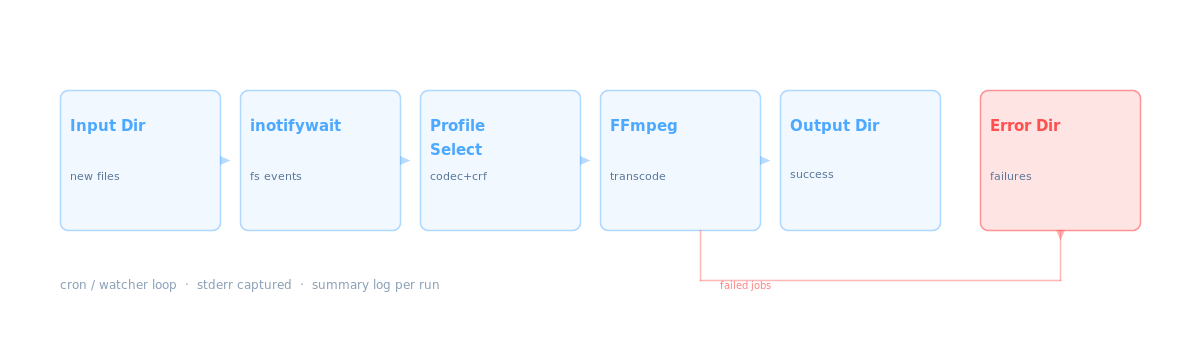
Pipeline stages: inotifywait triggers on new files, a profile selector chooses codec parameters, FFmpeg transcodes, and output lands in success or error directories.
Files are moved rather than copied into a working directory before encoding, so a partially written upload is never picked up. Success and failure are separated on disk, which makes a failed batch obvious without reading the log first.
Encoding profiles
Profiles are configuration files specifying codec, bitrate, resolution target, audio settings, and container format. Adding a profile does not require changes to the core script. The default set covers H.264 for web delivery, H.265 for archival, and audio-only extraction.
Metadata
The pipeline preserves source metadata where present — creation time, title, and comment fields — and applies a consistent set of output tags. GPS coordinates embedded in footage are retained in the output container.
Failure handling
Failed jobs are moved to an error directory with the FFmpeg stderr output saved alongside them. Successful jobs are moved to the output directory, and the source is optionally archived or deleted according to configuration.
A summary log records job counts, durations, and failures for each run. Nothing depends on watching the terminal: if a run fails, the evidence is on disk.
Built with
- Bash
- FFmpeg
- inotifywait
- H.264
- H.265
- Linux